Checking attendance and SMS health
Check attendance counts, queued-message delivery, device exceptions, and the class breakdown for a school date.
Use Attendance & SMS Health to check the school's attendance and message processing for a date. This monitoring page does not replace the class register.
Prerequisites
You need View SMS Logs access to open Student > Report > Attendance & SMS Health. Attendance or attendance-report access alone does not grant this permission. Ask an administrator if that menu is unavailable.
Open the school-date view
- Open Student > Report > Attendance & SMS Health.
- Check Campus. Choose the campus you need, or use All campuses when that scope is available.
- Check School date and its displayed time zone.
- Use Refresh to request the latest state.
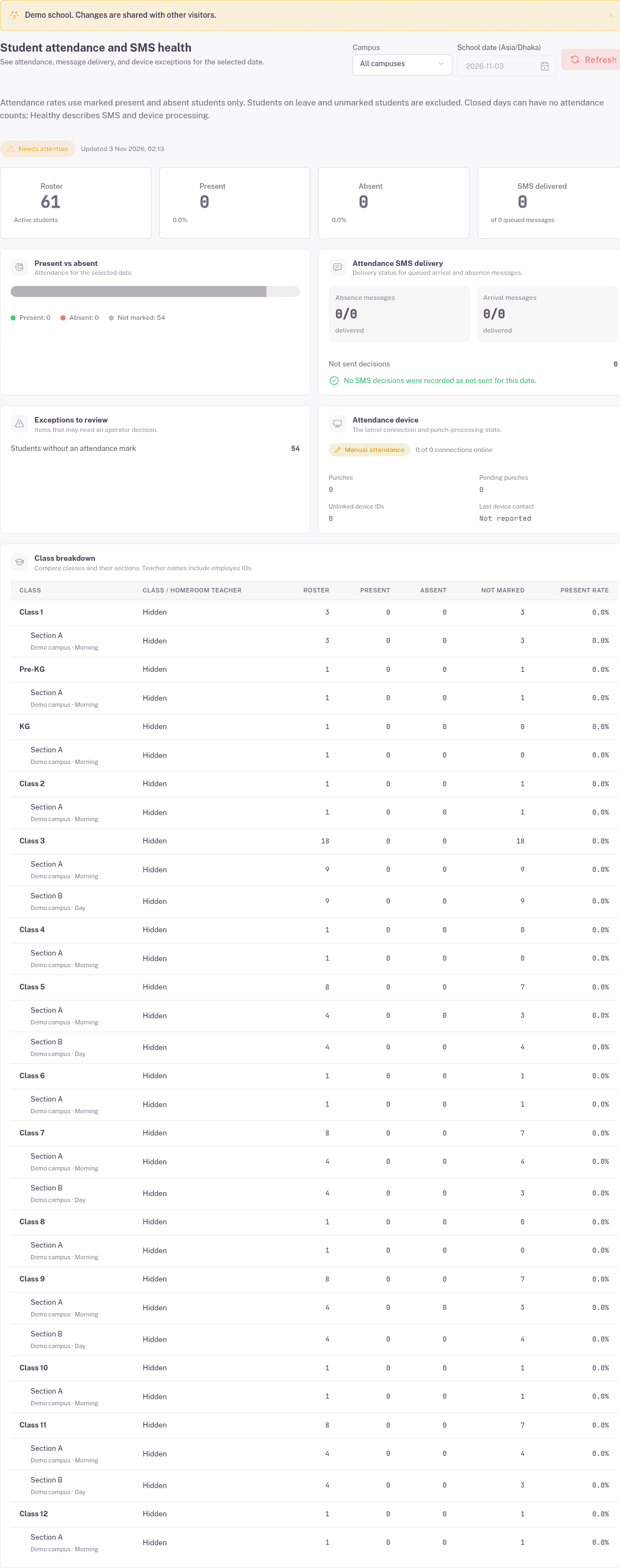
The page is headed Student attendance and SMS health. Its update time shows when the displayed information was read.
Read attendance separately from delivery
The top cards show Roster, Present, Absent, and SMS delivered. The attendance chart also separates Not marked.
Read the guidance above the cards: attendance rates use marked present and absent students only. Leave and unmarked students are excluded. A zero present count does not mean every unmarked student is absent.
The example has no queued messages. Its zero delivery count is not evidence that a message failed.
Check exceptions and devices
Review these sections before asking someone to send or retry a message:
- Attendance SMS delivery separates absence messages, arrival messages, and Not sent decisions.
- Exceptions to review names items that need attention, such as students without an attendance mark.
- Attendance device shows connection and punch-processing information, including pending punches and unlinked device IDs.
- Class breakdown compares classes and their sections. Teacher identity values are masked in the screenshot.
The demo shows Manual attendance with no device connections. Do not read this example as a connected device failure.
FAQ
Does Healthy mean everyone attended? No. The page explains that health describes SMS and device processing. Read the attendance counts separately.
Why does the roster exceed Present plus Absent? The page also tracks unmarked students, and its guidance excludes leave and unmarked students from attendance rates. Check the class breakdown and register before treating the difference as an absence.
Should I retry an SMS from a zero delivery count? Check whether any messages were queued and inspect their status first. Ask the school's authorised message reviewer to decide any retry.