How exams work in FEMS
The path from an exam you set up, to marks a teacher enters, to a printed report card, and who does each step.
The Exam module turns the marks a teacher writes into grades, GPA, class ranks, and printed report cards. This page explains that path once, so the other Exam pages can stay short.
Prerequisites
Anyone can read this page. You don't need any exam set up first.
Before your school runs its first exam, the academic structure has to exist: campuses, classes, sections, subjects, and the current academic session. An exam is created against an academic term and then set up class by class, so both the term and the classes have to be there first.
The six Exam screens
The Exam section of the sidebar holds six current screens, in this order. The demo sidebar also shows a legacy Old Report Card entry; it is not part of the current workflows documented here.
| Screen | What you do there | Who mostly uses it |
|---|---|---|
| Exam Management | Create an exam for a term, then set each class's subjects, marks, and pass marks. | Exam coordinator, admin |
| Marks & Evaluation | See which subjects have marks and which are still missing, and review what teachers submitted. | Exam coordinator, admin |
| Marks Entry | Type in each student's marks for one subject and one exam type. | Teacher |
| Junior Marks Entry | Record performance levels for younger classes that aren't graded on numbers. | Teacher |
| Remarks & Comments | Write the class teacher's comment that prints on the report card. | Class teacher |
| Reports & Exam Docs | Print admit cards, seat plans, mark sheets, merit lists, tabulation sheets, and report cards. | Exam coordinator, admin |
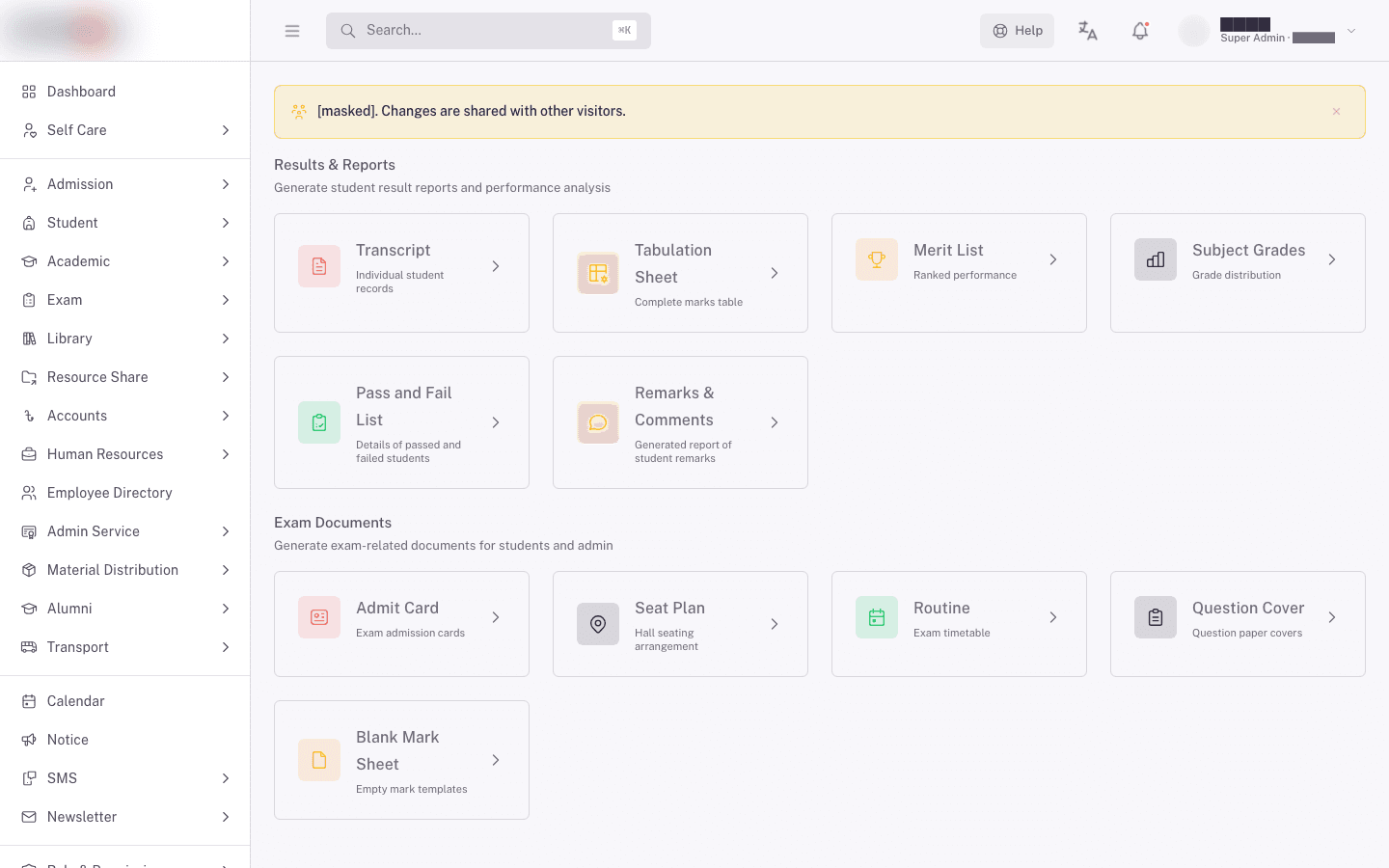
You only see the screens your role has access to. If a screen in this list isn't in your sidebar, your role doesn't include it. Ask your FEMS administrator.
The path of one exam
- Set the exam up. The exam coordinator creates the exam once for the term, then sets it up for each class: every subject in it, with its date and time, its full marks, and its pass marks. Those dates and times become the class's exam routine.
- Print what you need before exam day. Admit cards, seat plans, question covers, and blank mark sheets all come from Reports & Exam Docs, and none of them need marks to exist yet.
- Teachers enter marks. Each teacher opens Marks Entry, picks their class and subject, types the marks, and saves.
- FEMS works out the results. Saving marks starts a background calculation. It weighs each part of the subject, works out each subject's grade and GPA, then the student's overall CGPA and merit position. This takes a moment. It is not instant.
- Check the results. Use Marks & Evaluation to see what's in and what's missing, and the tabulation sheet or merit list under Reports & Exam Docs to read the calculated results.
- Add class teacher remarks. Open Remarks & Comments and write the comment that prints on each student's report card.
- Print the results. Report cards, transcripts, merit lists, and pass/fail lists all print from Reports & Exam Docs. Students see their own report card and admit card when they sign in to FEMS themselves, from the exam's Results Public Access date onwards.
Two grading systems, not one
FEMS grades senior and junior classes in completely different ways. Which one applies depends on the class.
Senior classes are graded on numbers. A teacher enters marks out of a total. FEMS converts those marks to a grade letter and a GPA using your school's grade scale, then averages the subjects into a CGPA. This is what produces merit positions and pass/fail results. Use Marks Entry.
Junior classes are graded on performance levels. There are no marks out of 100 and no GPA. A teacher records how the child performed against each assessment area, and can add a comment. Use Junior Marks Entry.
The two systems share no calculation. A junior class never gets a CGPA, and a senior class never gets a performance level. If someone asks you to "fix the grading", find out which of the two they mean first.
Words you'll see
| Term | What it means |
|---|---|
| Exam routine | The exam's timetable for one class: which subject is sat on which date, at what time, and for how long. Print it from Reports & Exam Docs > Routine. |
| Exam component | One row of the class exam setup: an exam type, with the weight and marks that go with it. One component per part of the subject. |
| Exam type | The part of the subject a mark belongs to: Written, Assessment, ECA, or Club. One subject can be marked in more than one type. |
| Full marks | The mark a student would get for a perfect answer in that part of the subject. |
| Pass marks | The lowest mark that counts as a pass for that part. Fall below it and the whole subject is a fail. |
| Weight | How much a part of the subject can contribute to the subject total. A part contributes the mark, divided by its full marks, times its weight. A 100-mark paper weighted at 70 contributes 70 for full marks and 42 for a score of 60. |
| Grade scale | Your school's bands. Each band gives a mark range, a grade name such as A+, and the GPA points that grade is worth. |
| GPA | The points a student earned in one subject. |
| CGPA | The student's overall points across their subjects, which is what report cards show as the final result. |
| 4th subject | An extra subject beyond the required ones. Grade points above a minimum your school sets are added to the CGPA. Below that minimum the subject adds nothing. |
| Pair subject | Two or more subjects that pass or fail together, checked against a combined pass mark rather than one each. |
| Merit position | The student's rank in the class or the section, worked out from CGPA and then total marks. |
What to expect after you save marks
Saving marks does not immediately update the report card. FEMS runs the calculation in three chained steps in the background: it works out each subject's converted mark, then each subject's grade and GPA, then the student's overall CGPA and grade.
In practice this means:
- Give it a moment before you check the tabulation sheet or merit list.
- If a result looks stale, reload the report page rather than re-entering the marks.
- If it stays stale, see Troubleshooting exam results.
FAQ
Do I have to enter marks for every subject before any result shows? No. Each subject is calculated as it comes in. But a student's CGPA and merit position are only meaningful once all their subjects are in, so treat a partly-entered exam's overall results as provisional.
Why is a student's grade an F when they passed on total marks? Most likely they fell below the pass marks on one part of the subject, or they failed a paired subject. A fail in any main subject forces the overall result to fail, whatever the total says.
Who can change the grade scale? Only your FEMS administrator. Grade bands are a school-wide setting, not something you change per exam or per class.
A student is missing from the marks entry list. Where are they? They're most likely not enrolled in that class and section for the current session, or the subject isn't among their chosen subjects. Fix the student record first, then come back to marks entry.
Can students see results before you're ready? Not until the exam's Results Public Access date. Before that a student gets "Transcript is not published yet!" when they look. Entering marks doesn't expose anything, so set that date to control what students see.
Related pages
- Creating an exam and its timeline
- Setting up a class exam
- Printing admit cards, seat plans, and other exam papers
- Entering marks as a teacher
- Recording junior assessment marks
- Tracking marks entry progress
- Writing report card remarks
- Generating report cards and transcripts
- Troubleshooting exam results
- How to set up an exam
- How to generate report cards
Running year-end student promotion
Move students up a class at year end, and carry the syllabus and teacher assignments into the new session.
Creating an exam and its timeline
Set up an exam for an academic session, fix its dates, pick its report template, and set the rules that decide when results can be printed.