How SMS works in FEMS
The life of a message from draft through proof-read, approval, and release to delivery, and who does each step.
Every SMS your team writes on the Send screen goes through a review pipeline before it reaches a phone. This page walks through why, what happens at each stage, and which of the five SMS screens you'll actually use. Automatic system messages, like payment receipts and one-time login codes, are sent by FEMS itself and skip this pipeline; they only show up in the delivery log.
Prerequisites
Anyone can read this page. What you personally do in the SMS module depends on your role: writing messages needs send access, reviewing them needs a Proof-reader, Approver, or Sender role, and setting up the module needs Settings access. See Managing templates and approvers for how those roles get assigned.
Why messages go through review
A bulk SMS goes straight to parents' and staff phones, and every message costs money per segment sent. A mistake reaches real people immediately and can't be recalled, so FEMS puts a second and third pair of eyes on every message written in Send SMS before it leaves: a proof-reader checks the wording, then an approver signs off, then a sender releases it.
The journey of one message
- Someone writes it. On the Send screen, the author picks an audience, writes the message (or starts from a template), and picks recipients. Submitting sends it into review with the status Awaiting proof-read.
- A proof-reader checks the wording. They read it in full on the Approvals screen and either mark it proof-read or decline it with a reason. Once proof-read, it moves to Awaiting approver.
- An approver signs off. Same Approvals screen, a different queue. Once approved, it moves to Awaiting send.
- A sender releases it. The final check. Releasing sends the message immediately, or at its scheduled time if one was set. Its status becomes Scheduled or Sent.
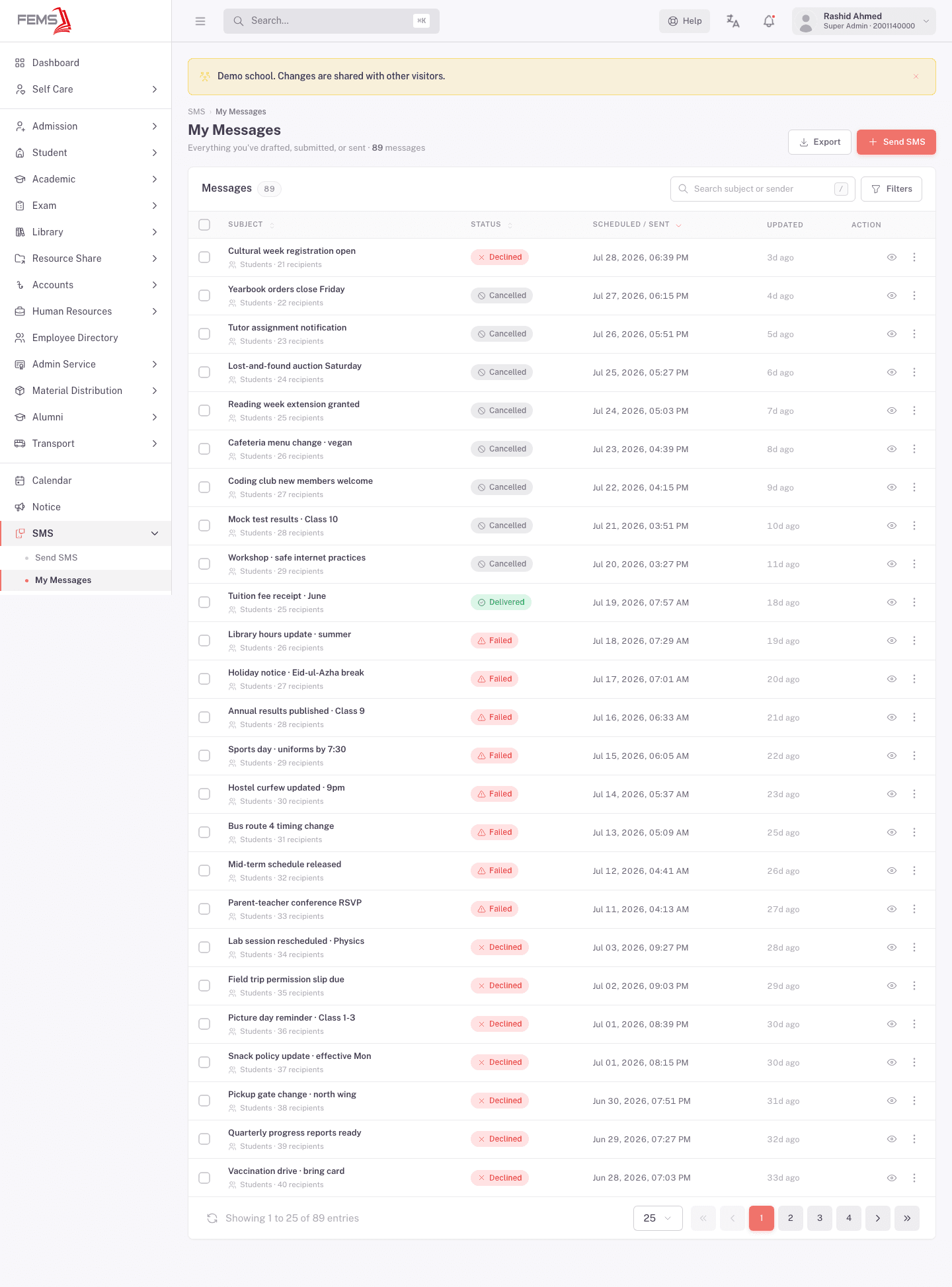
- FEMS reports delivery. As phones confirm receipt, the status updates to Delivered, Partially delivered, or Failed. Watch this on Messages.
One person can hold more than one review role. A Super Admin, for example, typically holds Proof-reader, Approver, and Sender all at once, and still has to clear their own message at each stage in the Approvals queue. The pipeline doesn't skip a stage just because you wrote the message yourself.
What each status means
| Status | What it means |
|---|---|
| Draft | Saved but not submitted. Only you can see it. |
| Awaiting proof-read | Submitted. Waiting on a proof-reader to check the wording. |
| Awaiting approver | Proof-read passed. Waiting on an approver to sign off. |
| Awaiting send | Approved. Waiting on a sender to release it. |
| Scheduled | Released for a future date and time. Sends automatically then. |
| Sent | Handed to the SMS provider. |
| Delivered | Every recipient's phone confirmed receipt. |
| Partially delivered | Some recipients received it, some didn't. |
| Failed | The provider couldn't deliver it to any recipient. |
| Declined | A proof-reader, approver, or sender sent it back with a reason. |
| Cancelled | The author withdrew it before it was released. |
The five screens and who uses them
| Screen | Who uses it |
|---|---|
| Send | Anyone with send access, to write a new message. |
| Messages | The author, to track everything they've drafted, submitted, or sent. |
| Approvals | Proof-readers, Approvers, and Senders, to clear their queue. |
| Settings | Admins, to assign review roles and manage templates. |
| Logs | Platform Super Admins only. Most schools never see this screen. It's the platform-wide stream of every SMS FEMS has ever sent, including one-time codes. |
FAQ
Why can't I just send an SMS directly? Because it reaches parents' and staff phones immediately and costs money per segment. FEMS requires a proof-reader and an approver to check it first so a mistake or an unauthorized message doesn't go out.
Who decides who the proof-readers and approvers are? An admin, in Settings. They assign the Proof-reader, Approver, and Sender roles to specific employees.
What happens if the approver rejects my message? It comes back to you as Declined, with the reviewer's reason. Edit and resubmit it, and it restarts from Awaiting proof-read.
Does a declined message cost anything? No. A declined message never reaches recipients, so no SMS segments are billed.
What's the difference between Sent and Delivered? Sent means FEMS handed your message to the SMS provider. Delivered means the recipients' phones confirmed receipt, which can take a little time to catch up after a message shows as Sent.